Nesthink Typeface Review for Web Designers
I was recently working on a landing page for a boutique coaching brand that needed to feel approachable yet professional. The client wanted to move away from the sterile, corporate aesthetic common in the industry and embrace something warmer. I pulled up my font library and tested Nesthink in the hero section. The moment those round, playful strokes rendered on the screen, the entire mood of the layout shifted. It wasn’t just a font change; it was a tonal shift that made the digital space feel inviting. As a web designer, I am always cautious about using decorative typefaces online because of readability concerns, but Nesthink proved to be a surprisingly versatile asset for modern typography.
Visual Personality and Digital Appeal
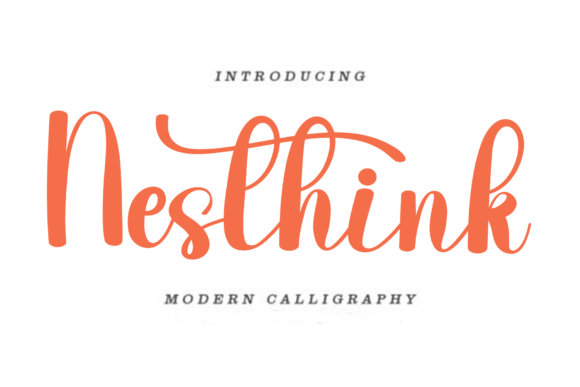
Nesthink is a casual and creative font that exudes warmth and friendliness. Visually, it sits comfortably in the category of a handwritten font or soft display typeface. Its defining characteristic is the rounded terminal strokes, which eliminate any sense of sharpness or aggression. In web design, where users scan content rapidly, this softness can lower cognitive load and create an immediate sense of trust. When I placed Nesthink against a clean white background, it felt airy and light. When I tested it over a muted pastel image banner, it maintained its legibility without competing with the photography.
This premium font does not try to be everything to everyone. It is not a utility player for body copy. Instead, it shines as a display font meant for impact. The curvature of the letters creates a relaxed rhythm that guides the eye naturally across short phrases. For designers building brand identity systems, this consistency in mood is invaluable. It tells the user that the brand behind the screen is human, accessible, and creative.
Strategic Placement in Web Layouts
The key to using Nesthink effectively in web design is restraint. I found it performed best in specific high-visibility areas:
- Hero Section Headlines: This is where Nesthink truly comes alive. Using it for the main value proposition on a landing page creates an instant emotional connection. It works particularly well for coaching websites, creative portfolios, and boutique online stores.
- Call-to-Action Buttons: While you must ensure the text remains large enough to read, using Nesthink for button labels like "Join Us" or "Get Started" can increase click-through rates by making the action feel less transactional and more communal.
- Section Dividers and Quotes: Breaking up long scrolls of text with a pull quote in Nesthink adds visual interest and gives the user’s eye a place to rest. It serves as a decorative accent that reinforces the brand voice.
- Logo Design: For small businesses or solopreneurs, Nesthink can serve as the primary logotype. Its unique character helps with brand recognition without requiring complex graphic elements.
However, I would advise against using Nesthink for navigation menus, form labels, or footer links. These elements require quick scanning and absolute clarity, which is better served by a neutral sans serif font. Nesthink is a star player, not a supporting actor for dense information architecture.
Readability and Responsive Considerations
One of the biggest challenges with decorative fonts is how they behave on mobile devices. During my testing, I resized the browser window to simulate various screen sizes. Nesthink held up remarkably well, provided the font size was adjusted appropriately. On desktop, a size of 48px to 64px worked beautifully for headers. On mobile, I had to reduce this to around 32px to 40px to prevent horizontal scrolling or awkward line breaks.
Because Nesthink has open counters and distinct letterforms, it avoids the blurring effect that plagues many script fonts at smaller sizes. However, you must be mindful of line height. Tight leading can cause the rounded tops and bottoms of the letters to touch, creating visual noise. I recommend increasing the line height to at least 1.2 or 1.3 times the font size when using Nesthink for multi-line headlines. This ensures that each letter breathes, maintaining the modern typography aesthetic that feels clean rather than cluttered.
When placing Nesthink over images, contrast is critical. I tested it on both light and dark backgrounds. On light backgrounds, a deep charcoal or navy blue provided excellent readability. On dark backgrounds, pure white worked well, but I had to ensure the image behind it was not too busy. A subtle overlay or blur effect on the background image can help the text pop, ensuring that the creative font remains the focal point.
Font Pairing for Balanced UI Design
A common mistake in editorial design and web layouts is pairing two decorative fonts. Nesthink demands a partner that is understated and functional. My go-to pairing is a clean, geometric sans serif font like Montserrat, Lato, or Inter. This combination creates a beautiful hierarchy: Nesthink draws attention and sets the tone, while the sans serif handles the informational heavy lifting.
For a more sophisticated, editorial look, you might pair Nesthink with a modern serif font. This works well for lifestyle blogs or luxury product pages where you want to evoke a sense of tradition mixed with playfulness. The serif provides structure and authority, while Nesthink injects personality. Avoid pairing it with another script font or highly stylized handwritten typeface, as this will create visual competition and confuse the user’s eye.
Technical Implementation and Licensing
Before integrating Nesthink into a client project, it is essential to check the technical specifications. Ensure you have the correct file formats for web use, typically WOFF or WOFF2, which offer compression and fast loading times. Slow-loading fonts can negatively impact user experience and SEO rankings. If you are using a platform like WordPress or Shopify, verify that the theme supports custom font uploads or that you are using a reliable CDN service.
Additionally, always review the commercial font licensing terms. If you are designing a website for a client who sells products or services, you need a license that covers commercial web use. Some licenses may restrict the number of page views or domains. It is also wise to check for multilingual support if your audience is global. While Nesthink is perfect for English-based designs, verify if it includes the special characters or accents needed for other languages.
In conclusion, Nesthink is a powerful tool in a web designer’s arsenal when used with intention. It transforms cold digital interfaces into warm, welcoming spaces. By respecting its limitations regarding length and size, and pairing it with functional typography, you can create design assets that not only look beautiful but also enhance user engagement and brand loyalty. It is a testament to how the right typeface can bridge the gap between aesthetic appeal and functional design.